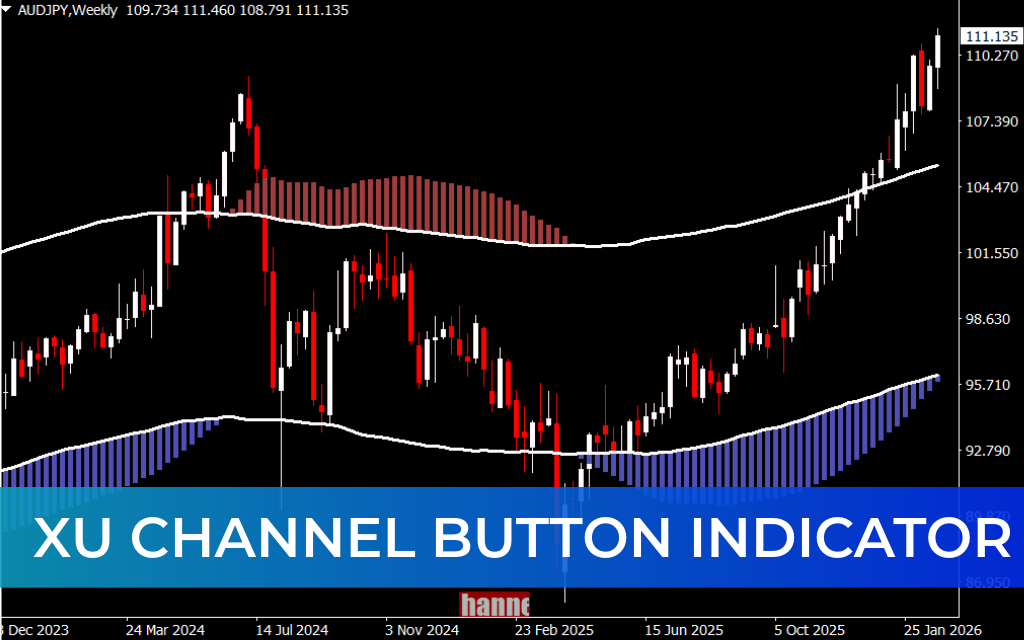
Channel trading remains one of the most reliable methods for identifying trends, support, and resistance levels in the market. The XU Channel Button Indicator for MT4 enhances traditional channel trading by combining dynamic price channels with momentum histograms, helping traders make more precise and confident decisions.
If you trade trends or breakouts on MetaTrader 4, this indicator provides a structured way to spot high-probability setups
.
What Is the XU Channel Button Indicator?
The XU Channel Button Indicator is a channel-based trading tool designed specifically for the MetaTrader 4 (MT4) platform. It automatically draws trading channels that highlight:
- Dynamic support levels
- Dynamic resistance levels
- Overall market trend direction
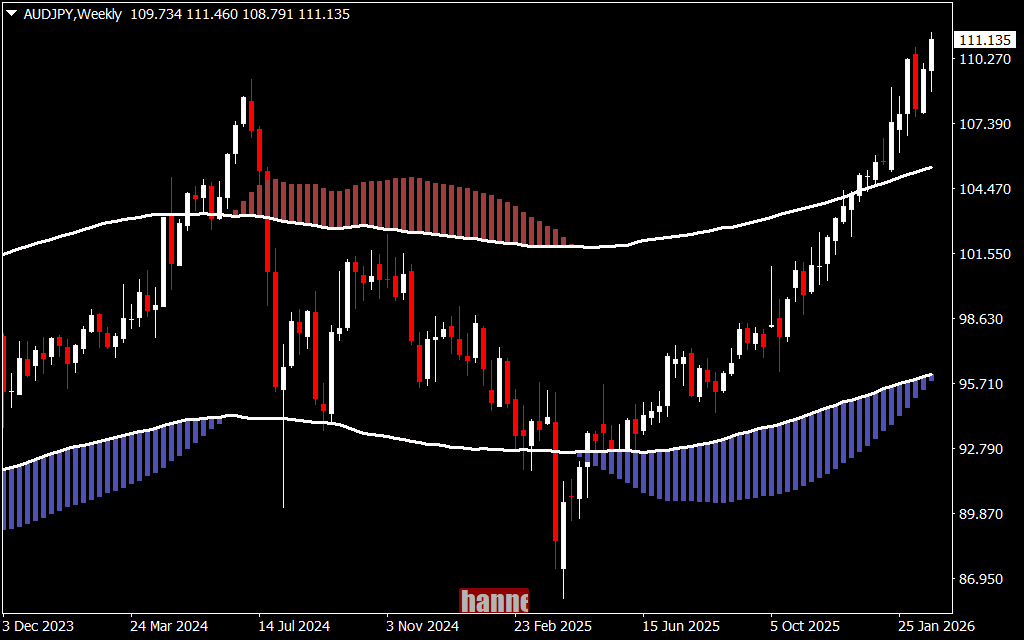
What makes this indicator unique is its built-in momentum histogram, which visually confirms whether the prevailing trend is strengthening or weakening.
Key Features of the XU Channel Button Indicator
1. Automatic Channel Detection
The indicator plots price channels that define the current trend structure. This makes it easy to see whether the market is:
- Moving in an ascending channel
- Moving in a descending channel
- Entering consolidation
2. Built-in Momentum Histograms
Momentum is displayed using color-coded histograms:
- Blue Histograms – Bullish momentum
- Red Histograms – Bearish momentum
This helps confirm whether the Price Action aligns with trend strength.
3. Support & Resistance Visualization
The channel boundaries act as dynamic Support And Resistance levels, allowing traders to plan entries and exits with clarity.
4. Breakout Confirmation Logic
The indicator supports breakout trading by helping traders confirm when price closes beyond channel boundaries multiple times.
How Channel Trading Works
In standard channel trading:
- Open a buy position when price reaches channel support
- Open a sell position when price reaches channel resistance
This approach assumes price will retrace after touching support or resistance.
However, if price breaks and closes beyond the channel boundaries, it may signal a strengthening trend rather than a reversal.
To reduce false breakouts, wait for price to close outside the channel at least two times before entering a breakout trade.
How to Use the XU Channel Button Indicator for MT4
There are two primary strategies when using this indicator:
1. Trading the Trend
This method involves trading in the direction of the established channel.
- In an ascending channel → Look for buying opportunities
- In a descending channel → Look for selling opportunities
You can also trade temporary retracements:
- Enter immediately after price touches support or resistance
- Confirm with histogram color change
- Blue histogram → Bullish shift
- Red histogram → Bearish shift
This allows early entries during potential long-term reversals.
2. Trading the Breakout
When price closes beyond channel support or resistance, it may indicate a strong continuation move.
Breakout Rules:
- Wait for at least two confirmed closes outside the channel
- Trade in the direction of the breakout
- Buy if price closes above resistance
- Sell if price closes below support
The histogram helps confirm whether momentum supports the breakout direction.
Why Traders Choose the XU Channel Button Indicator
- Clear visual channel structure
- Built-in momentum confirmation
- Suitable for trend and breakout traders
- Works on multiple timeframes
- Easy integration with other MT4 strategies
By combining structure (channels) and strength (momentum), this indicator reduces guesswork and improves trade timing.
Conclusion
The XU Channel Button Indicator for MT4 provides a comprehensive channel trading system enhanced with momentum confirmation. Whether you prefer trading pullbacks within a trend or breakout continuations, this tool offers clarity, structure, and improved decision-making.
For traders who rely on support, resistance, and Trend Strength, this indicator can become a valuable addition to your MT4 trading setup.
FAQ
13 Downloads
Published:
Feb 28, 2026 17:15 PM
Category: