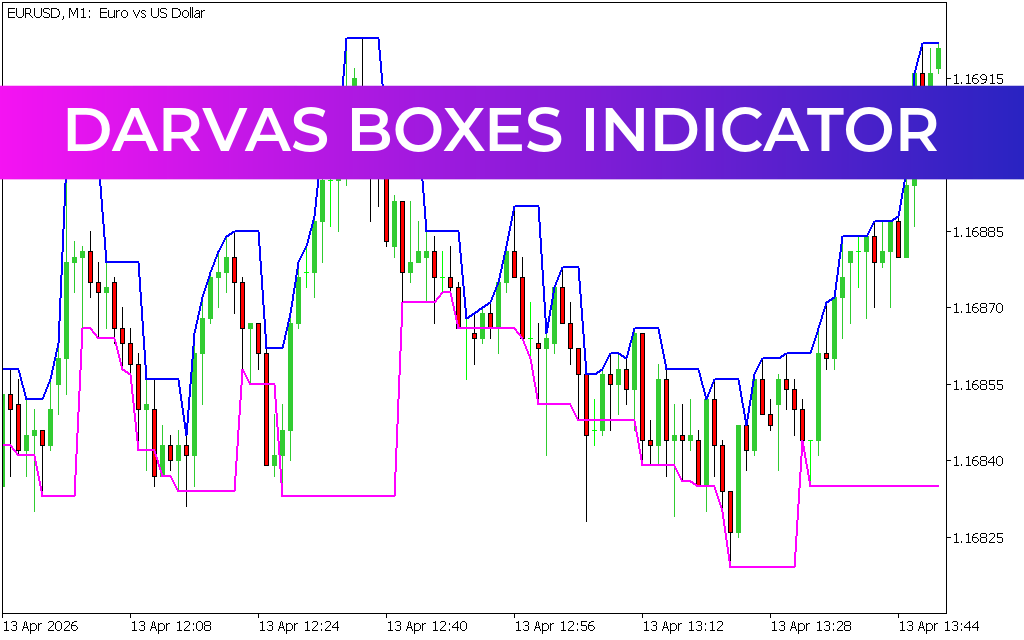
The Darvas Boxes Indicator for MetaTrader 5 (MT5) is a technical analysis tool inspired by the famous trading strategy of Nicholas Darvas, who famously turned a small trading account into over $2 million in less than two years using momentum-based trading principles.
This indicator is designed to help traders identify trend breakouts, momentum shifts, and high-probability entry points by visually organizing Price Action into dynamic “boxes” or price ranges.

What Is the Darvas Boxes Indicator?
The Darvas Boxes Indicator is a trend-following breakout tool that automatically draws rectangular price zones (boxes) on the chart.
These boxes represent:
- Consolidation phases (range-bound markets)
- Breakout levels (trend initiation points)
- Momentum continuation zones
Unlike predictive indicators, Darvas Boxes are reactive, meaning they respond to price movement rather than forecasting it. This makes them more adaptable to real market behavior.
How the Darvas Boxes Indicator Works
The indicator continuously tracks price highs and lows and forms “boxes” around Market Structure.
Key behavior:
- Price stays inside a box during consolidation
- A breakout above or below the box signals potential trend continuation
- New boxes form as the trend evolves
This helps traders visually understand market structure without complex analysis.
Buy Signal (Bullish Breakout Setup)
A potential buy opportunity occurs when:
- Price breaks above the upper boundary of a Darvas box
- Momentum continues upward into a new higher box
- Market confirms strength with continued bullish movement
Entry Strategy:
- Enter BUY after a confirmed breakout above resistance box
- Use previous box level as stop-loss reference
- Hold position as long as price continues forming higher boxes
Sell Signal (Bearish Breakout Setup)
A potential sell opportunity occurs when:
- Price breaks below the lower boundary of a Darvas box
- A new lower box begins forming
- Downward momentum continues
Entry Strategy:
- Enter SELL after breakdown below support box
- Place stop-loss slightly above breakout box
- Hold while price continues creating lower structures
Best Timeframes for Darvas Boxes
The indicator performs best on:
- 📊 H1 (1-hour chart)
- 📊 H4 (4-hour chart)
- 📈 Daily chart for swing trading
Lower timeframes can be used for Scalping, but they may produce more noise and false breakouts.
Trading Strategy Tips
To maximize effectiveness:
- Trade only after clear box breakouts
- Avoid entering trades during sideways consolidation inside boxes
- Combine with price action confirmation (candles, wicks, volume)
- Use higher timeframe trend alignment for better accuracy
Risk Management Approach
A common risk structure includes:
- Stop-loss placed just outside the breakout box
- Take profit based on 1:1 risk-reward ratio or trend continuation
- Trail stops as new boxes form in the trend direction
Advantages of Darvas Boxes Indicator
- Simple visual structure for market analysis
- Helps identify breakout and momentum trades
- Works in both trending and ranging markets
- Suitable for beginners and advanced traders
- Supports intraday and swing trading strategies
Limitations
While powerful, the indicator is not perfect:
- Can produce false breakouts in choppy markets
- Requires confirmation from price action or other tools
- Not ideal as a standalone trading system
For best results, it should be combined with:
- Support and resistance analysis
- Candlestick patterns
- Trend indicators or volume tools
Final Thoughts
The Darvas Boxes Indicator for MT5 is a highly effective momentum-based breakout tool that helps traders visually identify trend structures and potential entry points. By organizing price action into clear zones, it simplifies decision-making and supports disciplined breakout trading strategies.
However, like all indicators, it works best when used alongside proper risk management and additional confirmation tools rather than in isolation.
2 Downloads
Published:
Apr 13, 2026 12:27 PM
Category: