The JAZIB TREND PRECISION Indicator for MT4 is a technical trading tool designed to help traders analyze market direction and identify potential trading opportunities directly on the MetaTrader 4 chart. The indicator combines visual trend analysis with buy and sell signal markers, making it easier to monitor price movements and recognize possible changes in market momentum.
Trading with a clear understanding of the current market trend can help traders make more structured decisions. Instead of relying only on raw Price Action, the JAZIB TREND PRECISION Indicator provides visual elements on the chart that can assist traders in analyzing bullish and bearish conditions.
The indicator is suitable for traders who use MetaTrader 4 and want a simple chart-based approach to trend analysis. It can be used as part of a broader trading strategy alongside Support And Resistance, price action, moving averages, and other technical analysis methods.
Risk Warning: Trading Forex, binary options, and other financial markets involves significant risk. No indicator can guarantee profits or 100% accurate signals. Always perform your own analysis and use proper risk management before entering any trade.
What Is JAZIB TREND PRECISION Indicator?
The JAZIB TREND PRECISION Indicator is an MT4 trading indicator focused on identifying potential market trends and possible entry points. It displays visual signals directly on the price chart, allowing traders to quickly observe potential bullish and bearish setups.
The indicator is designed to make technical analysis more convenient by presenting important information in an easy-to-understand visual format. Traders can use the displayed signals as a starting point for additional market analysis rather than treating every signal as an automatic trade entry.
Depending on the market conditions, the indicator may help traders identify:
Potential bullish market conditions
Potential bearish market conditions
Possible buy opportunities
Possible sell opportunities
Potential trend changes
Areas where traders may want to perform additional analysis
The goal is to provide a cleaner way to monitor market movements while keeping the trader focused on the overall trend.
Key Features of JAZIB TREND PRECISION Indicator for MT4
The JAZIB TREND PRECISION Indicator for MT4 includes several visual features designed to support technical market analysis.
Buy and Sell Signal Arrows
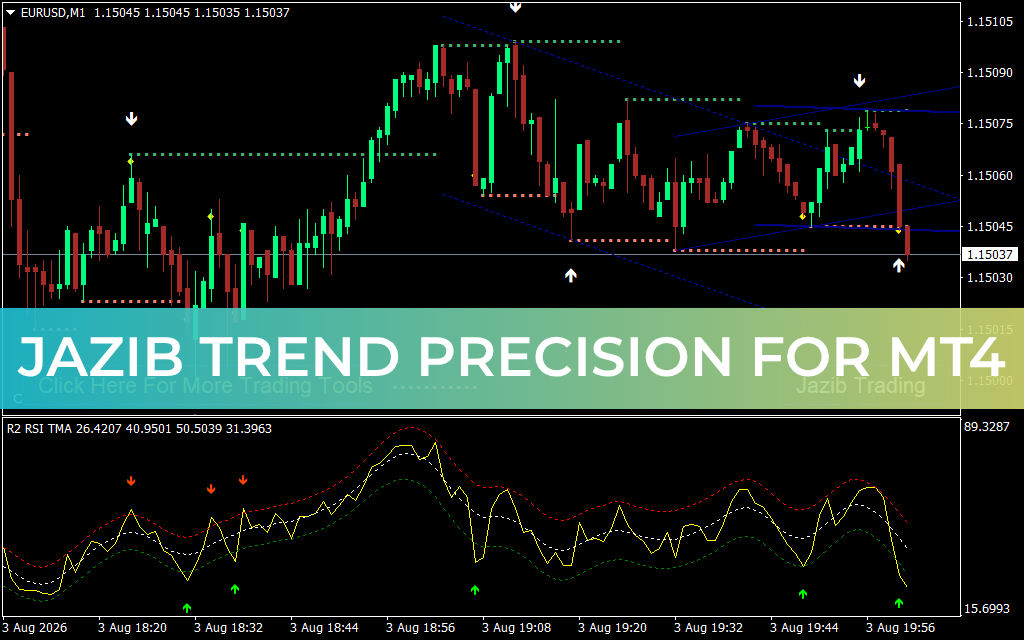
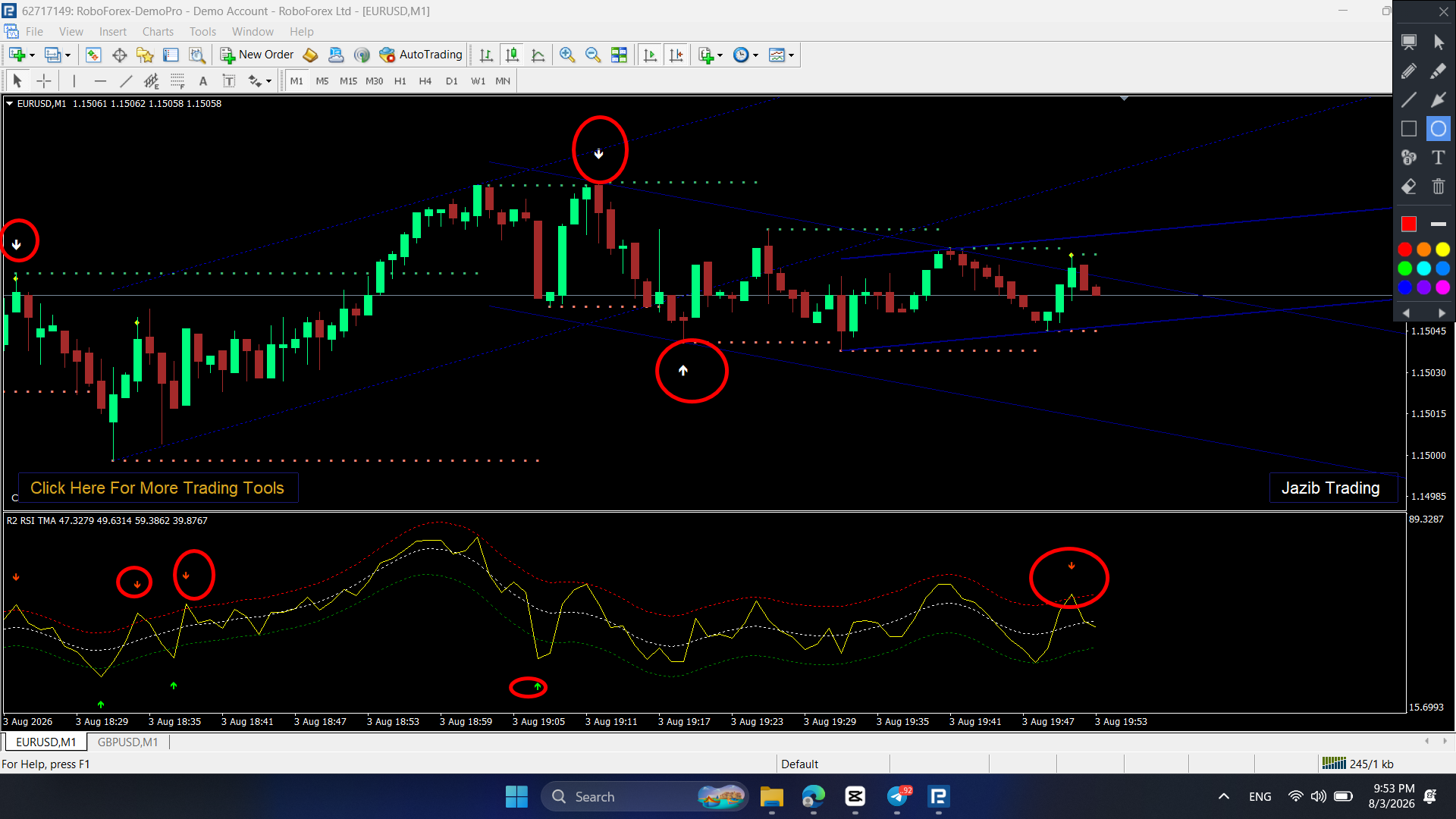
One of the main features of the indicator is the use of visual arrows to highlight potential trading signals. Buy and sell markers can help traders quickly identify areas that may require closer attention.
These signals should be confirmed with additional analysis before opening a position.
Trend Analysis
The indicator is designed to assist traders in recognizing the general direction of the market. Understanding whether the market is moving upward, downward, or consolidating can be an important part of developing a trading plan.
Visual Chart Levels
The chart display may include visual levels and lines that help traders observe areas of potential market interest. These can be combined with traditional technical analysis techniques such as support and resistance.
Additional Momentum Confirmation
The indicator setup shown on the MT4 chart can be used alongside an oscillator-style confirmation panel. This can help traders compare the direction of price movement with momentum conditions.
Easy-to-Read MT4 Interface
The indicator uses visual signals and chart-based elements, making it easier to monitor potential setups without manually analyzing every individual price movement.
How Does JAZIB TREND PRECISION Indicator Work?
The JAZIB TREND PRECISION Indicator analyzes market price data and displays visual information that can help traders interpret potential trend conditions.
When a potential bullish setup is detected, a buy-style signal may appear on the chart. Similarly, bearish conditions may be represented with a sell-style signal.
A simple approach to using the indicator is:
Open the desired currency pair in MetaTrader 4.
Select the appropriate trading timeframe.
Add the JAZIB TREND PRECISION Indicator to the chart.
Observe the current market trend.
Wait for a potential buy or sell signal.
Confirm the signal using price action or other technical analysis.
Define your entry, stop-loss, and take-profit levels.
Manage the trade according to your risk management plan.
The indicator should be considered a technical analysis tool rather than a standalone trading system. Market conditions can change quickly, and signals may perform differently depending on volatility, timeframe, and asset.
How to Use JAZIB TREND PRECISION Indicator for MT4
Using the indicator effectively requires combining its signals with a consistent trading strategy.
Step 1: Identify the Market Trend
Before considering an entry, determine whether the market is generally bullish, bearish, or moving sideways.
For example, during a strong bullish trend, traders may focus more on potential buy setups. During a bearish trend, traders may look for potential sell opportunities.
Step 2: Wait for a Signal
Once the general trend is identified, monitor the chart for a new signal. Avoid entering trades simply because an arrow appears without considering the broader market structure.
Step 3: Confirm the Setup
Use additional confirmation tools such as:
Support and resistance
Candlestick patterns
Trendlines
Moving averages
Market structure
Momentum indicators
Higher-timeframe analysis
Confirmation can help traders filter out some weaker setups.
Step 4: Manage Risk
Before entering any trade, determine the maximum amount you are willing to risk. A stop-loss can be used to limit potential losses, while a predefined take-profit target can help maintain a structured trading plan.
Never risk money you cannot afford to lose.
JAZIB TREND PRECISION Indicator Trading Strategy
A simple strategy using the JAZIB TREND PRECISION Indicator for MT4 is to combine trend direction with signal confirmation.
For a potential buy setup, traders can look for:
The market showing bullish structure
A potential buy signal appearing on the chart
Price trading near a relevant support area
Momentum supporting the upward direction
Confirmation from the selected timeframe or a higher timeframe
For a potential sell setup, traders can look for:
The market showing bearish structure
A potential sell signal appearing on the chart
Price approaching a relevant resistance area
Momentum supporting downward movement
Confirmation from higher-timeframe analysis
This approach can help traders avoid blindly following every signal and instead focus on setups that align with the broader market context.
Best Timeframe for JAZIB TREND PRECISION Indicator
The best timeframe depends on your trading style and personal strategy.
Scalpers may prefer lower timeframes such as M1, M5, or M15, while intraday traders may consider M15, M30, or H1. Swing traders may prefer higher timeframes such as H4 or Daily.
Lower timeframes generally produce more signals but can also contain more market noise. Higher timeframes may provide fewer signals but can offer a broader view of market direction.
It is recommended to test the indicator on a demo account and determine which timeframe best matches your trading strategy.
Advantages of JAZIB TREND PRECISION Indicator
Some potential advantages of using the indicator include:
Simple visual trading signals
Designed for MetaTrader 4
Helps analyze market direction
Buy and sell signals displayed directly on the chart
Can be combined with other technical analysis tools
Suitable for different trading approaches
Helps traders monitor potential trend changes
Easy-to-understand chart presentation
The indicator can be especially useful for traders who prefer visual tools when analyzing price charts.
Important Things to Consider
No trading indicator can predict the future movement of financial markets with certainty. Even when an indicator provides a clear signal, the market can move in the opposite direction.
For this reason, traders should avoid relying on a single indicator. The JAZIB TREND PRECISION Indicator can be used as one component of a complete trading strategy.
Consider combining the indicator with:
Proper money management
Stop-loss protection
Support and resistance analysis
Price action
Market structure
Multiple timeframe analysis
Economic news awareness
Backtesting and demo trading are also recommended before using any strategy with real funds.
Download JAZIB TREND PRECISION Indicator for MT4
If you are looking for a visual trend and signal tool for MetaTrader 4, the JAZIB TREND PRECISION Indicator for MT4 can be added to your technical analysis toolkit.
Before using the indicator on a live trading account, test its behavior under different market conditions and timeframes. Make sure you understand how the signals work and develop clear rules for entries, exits, and risk management.
For more MT4 indicators, Forex trading tools, and trading systems, visit IndicatorForest.com and explore the available collection of technical analysis resources.
Final Thoughts
The JAZIB TREND PRECISION Indicator for MT4 is designed to help traders visually analyze market trends and potential trading opportunities. With chart-based buy and sell signals and additional visual trend information, it can make the process of monitoring price action more convenient.
However, traders should remember that indicators are tools for analysis, not guaranteed profit generators. The most effective approach is to combine technical indicators with market structure, price action, risk management, and a well-tested trading plan.
Always test the indicator on a demo account first and use proper risk management when trading financial markets.