i-Session Indicator for MT4 – Easily Track Forex Trading Sessions
If you trade forex, you’ve likely heard about different trading sessions, but it can be confusing to know when they start and end. The i-Session Indicator simplifies this by clearly marking the Asian, European, and American sessions on your chart.
What is the i-Session Indicator?
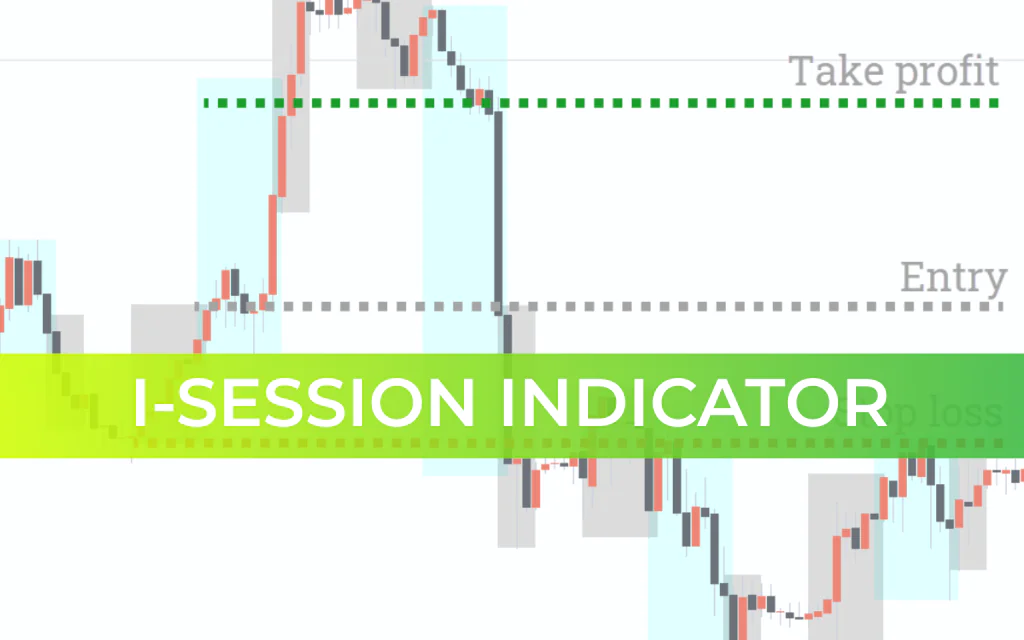
The i-Session is a session separator indicator that helps traders visually distinguish between trading sessions. Each session can be color-coded, allowing you to:
Identify the current trading session instantly
Track price behavior and price ranges during specific sessions
Take advantage of high-volatility periods efficiently
How to Use the i-Session Indicator
The indicator provides two major insights:
Price patterns during a session – Identify whether the market is ranging, trending, or counter-trending
Price range of a session – Determine upper and lower boundaries for potential trades
With this information, traders can forecast the next price movement or trade breakouts/bounce-backs from session ranges.
Trading Strategies
Buy Setup:
Wait for the Asian session to close and the European session to begin.
If the price breaks out above the Asian session range, look for a buying opportunity.
Enter a long position after the bullish candle closes.
Place stop-loss below recent price consolidation.
Set take-profit at 1.5× the stop-loss.
Avoid trading if the session’s spread exceeds 50 pips.
Sell Setup:
Wait for the Asian session to close and the European session to begin.
If the price breaks out below the Asian session range, look for a selling opportunity.
Enter a short position after the bearish candle closes.
Place stop-loss above recent price consolidation.
Set take-profit at 1.5× the stop-loss.
Avoid trading if the session’s spread exceeds 50 pips.
Conclusion
The i-Session Indicator helps traders track forex trading sessions, identify key price ranges, and plan trades around high-volatility periods. As with all indicators, it should be tested on demo accounts or backtested before using in live trading. Proper application ensures safer and more effective trading decisions.
FAQ
12 Downloads
Published:
Feb 20, 2026 10:53 AM
Category: