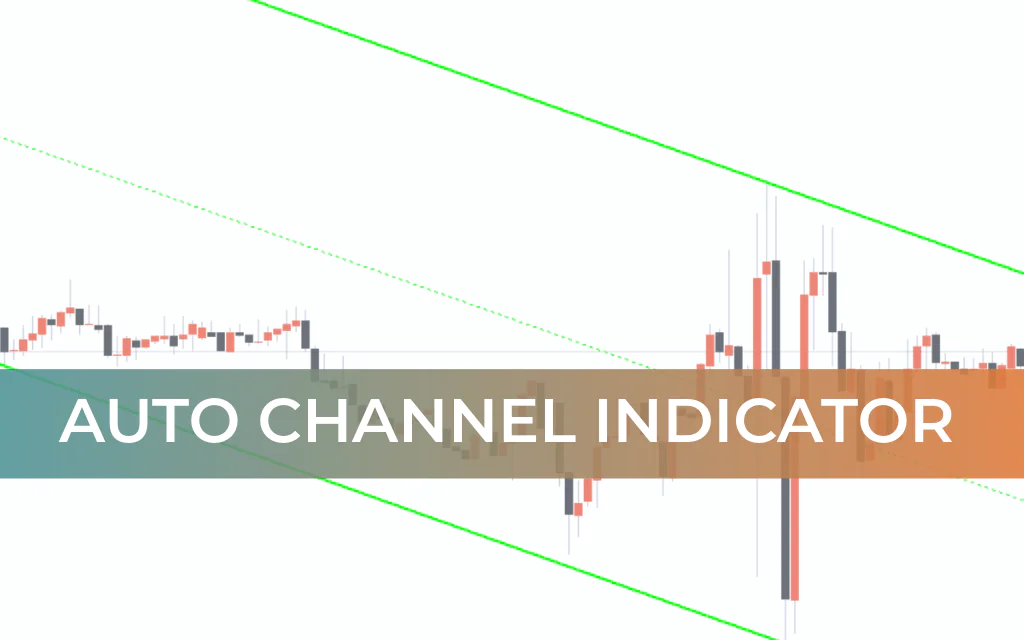
The Auto Channel Indicator for MT4 is a powerful MetaTrader tool that automatically draws an equidistant price channel on your chart. It identifies the slope of the channel to clearly define bullish and bearish market conditions, while simultaneously plotting dynamic Support And Resistance levels.
By eliminating the need to manually draw channels, this indicator saves time and ensures accurate, consistent channel placement — making it especially valuable for new forex traders.
Key Features
Automatically draws equidistant price channels
Identifies bullish (ascending) and bearish (descending) trends
Outer channel lines act as dynamic support and resistance
Displays channel slope and size directly on the chart
Provides high risk-reward trading opportunities
Free to download and easy to install
Why Use the Auto Channel Indicator?
Drawing proper equidistant channels manually can be difficult, particularly for beginner traders. This indicator simplifies the process by:
Automatically plotting ascending and descending channels
Marking key reversal areas
Helping traders identify high-probability entry points
Improving stop-loss placement accuracy
Advanced traders can incorporate the Auto Channel Indicator into both trend-following and counter-trend strategies.
Auto Channel Indicator for MT4 – Trading Signals
On the chart:
Outer channel lines are plotted in GREEN
Midline appears as a dotted GREEN line
A RED circle appears when price touches outer channel boundaries
Channel size and slope are displayed as chart comments
Buy Setup (Ascending Channel)
An ascending channel signals a bullish market condition.
Entry Rules:
Wait for price to touch the lower channel boundary (support).
Look for a bullish reversal candlestick pattern.
Enter a BUY position.
Stop Loss:
Below the previous swing low.
Take Profit:
Near the upper channel boundary or next resistance level.
Since the lower boundary acts as support, it often provides excellent risk-to-reward opportunities.
Sell Setup (Descending Channel)
A descending channel signals a bearish market condition.
Entry Rules:
Wait for price to touch the upper channel boundary (resistance).
Confirm with a bearish reversal candlestick pattern.
Enter a SELL position.
Stop Loss:
Above the previous swing high.
Take Profit:
Near the lower channel boundary or next support level.
Important Trading Tip
Always confirm entries with:
Reversal candlestick patterns
Price Action analysis
Support and resistance structure
The indicator works on all timeframes, including:
Intraday charts
Daily charts
Weekly charts
Monthly charts
However, combining it with price action significantly improves accuracy.
Benefits of the Auto Channel Indicator
Eliminates manual channel drawing errors
Clearly defines trend direction
Provides automatic support and resistance
Suitable for both beginners and advanced traders
Offers strong risk-to-reward setups
Conclusion
The Auto Channel Indicator for MT4 is an essential tool for technical forex traders. It automatically draws equidistant channels, identifies bullish and bearish trends, and highlights strong support and resistance zones.
By combining automatic channel plotting with price action confirmation, traders can build high-probability strategies with favorable risk-reward ratios.
This indicator deserves a permanent place in every serious trader’s toolkit.
FAQ
3 Downloads
Published:
Feb 20, 2026 06:29 AM
Category: