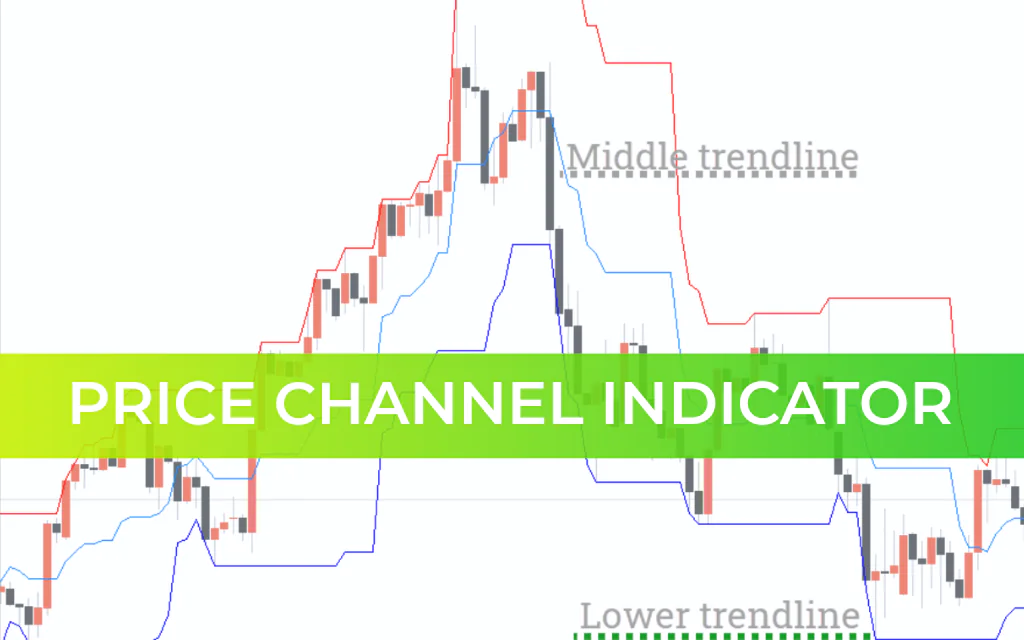
The Price Channel Indicator for MT4 helps traders visualize price oscillations between three parallel lines — upper, lower, and middle channel lines. These channels may be horizontal, ascending, or descending, depending on market direction.
This indicator is especially effective for identifying breakouts, which occur when price closes above the upper channel or below the lower channel.
What is the Price Channel Indicator?
The Price Channel Indicator calculates:
Upper Price Channel → Highest high over a defined period
Lower Price Channel → Lowest low over a defined period
Middle Line → The midpoint between the upper and lower channels
By default, the calculation period is 14, meaning the channel is based on the highest high and lowest low of the last 14 candles.
Unlike volatility-based indicators such as Bollinger Bands or Average True Range (ATR), the Price Channel Indicator is purely based on price extremes. This makes it highly effective for identifying key Support And Resistance zones.
During consolidation or sideways movement, channels often narrow. This contraction typically occurs before a breakout, making the indicator valuable for anticipating strong moves.
Types of Price Channels
Ascending Channel
Both lines slope upward
Indicates higher highs and higher lows
Signals a bullish trend
Descending Channel
Both lines slope downward
Indicates lower highs and lower lows
Signals a bearish trend
Horizontal Channel
Flat support and resistance
Indicates consolidation or ranging market
The upper and lower channel lines act as dynamic resistance and support levels.
How to Use the Price Channel Indicator
The indicator serves two primary purposes:
Identify support and resistance for channel trading
Spot breakouts when price closes outside the channel
Price Channel Trading Strategy
You have the best opportunity when the market respects the channel structure clearly.
Buy Setup (Breakout Strategy)
Price closes above the upper channel
Wait for confirmation candle
Enter at the confirmation candle
Place stop-loss near the recent swing low
Exit when price falls back below the upper channel
Sell Setup (Breakout Strategy)
Price closes below the lower channel
Wait for confirmation candle
Enter at the confirmation candle
Place stop-loss near the recent swing high
Exit when price rises back above the lower channel
Channel Bounce Strategy (Alternative Method)
Buy near the lower channel in a ranging market
Sell near the upper channel in a ranging market
Place stop-loss slightly outside the channel
Conclusion
The Price Channel Indicator for MT4 is a versatile tool that helps traders:
Identify dynamic support and resistance
Trade price bounces within a channel
Detect breakout opportunities
Recognize consolidation before major moves
For best results, combine the indicator with trend confirmation tools, volume analysis, or Price Action strategies.
It is simple, effective, and suitable for both beginners and advanced forex traders.
FAQ
Published:
Feb 20, 2026 11:37 AM
Category: