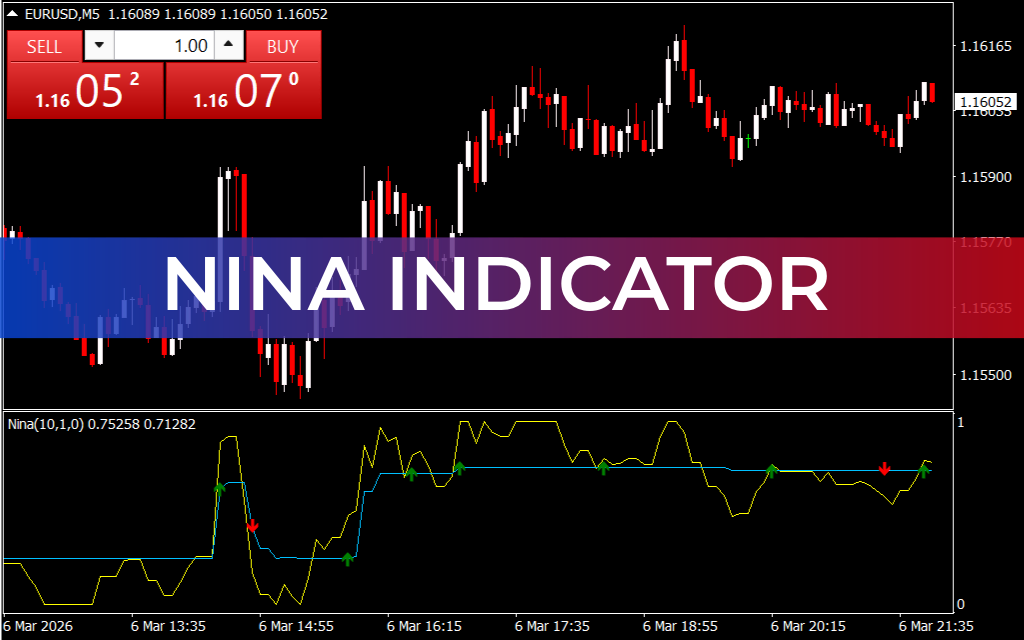
The Nina Indicator for MT4 is a simple trend-following tool designed to help traders identify the overall market direction and potential trading signals. It combines ATR-based signal lines with visual arrows to highlight possible buy and sell opportunities.
The indicator works within the MetaTrader 4 platform and is suitable for traders who want a clear visual guide to market trends.
The Nina Indicator includes two main components:
- ATR-based signal lines
- Buy and sell arrows
Together, these elements help traders determine trend direction and potential entry points.
How the Nina Indicator Works
The Nina Indicator uses calculations based on the Average True Range (ATR) to analyze price volatility and trend direction.
ATR Signal Lines
The indicator displays two dynamic lines:
- Yellow Line
- Blue Line
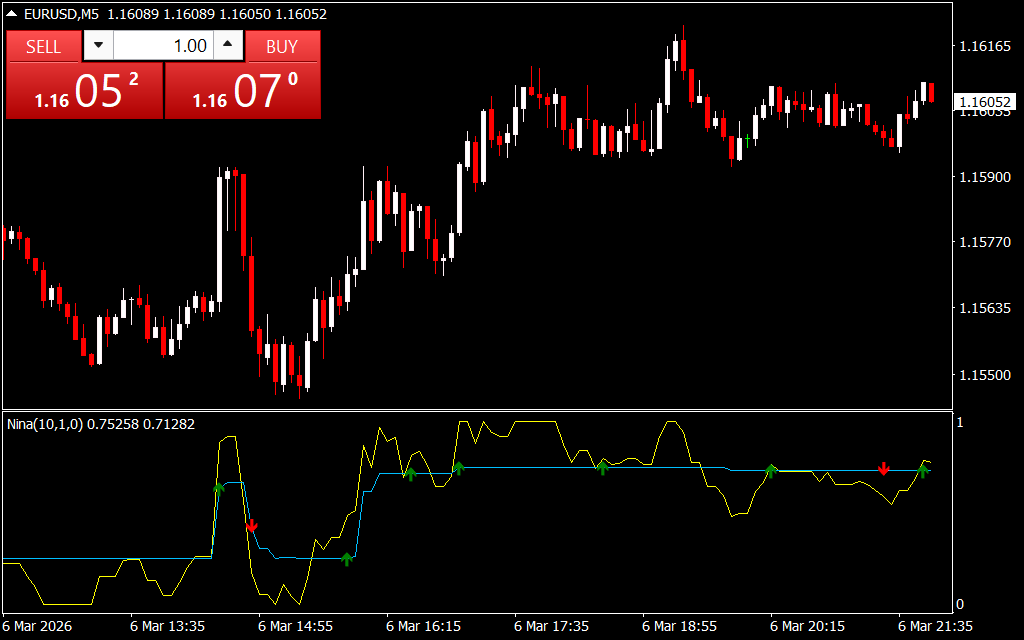
These lines move with the price and indicate the current market trend.
Trend interpretation:
- Yellow line above blue line → Bullish trend
- Blue line above yellow line → Bearish trend
This crossover system helps traders identify the dominant market direction.
Arrow Signals
The second component of the indicator is visual trading arrows:
- Green Arrow (Up Arrow) → Indicates a buy signal
- Red Arrow (Down Arrow) → Indicates a sell signal
These arrows appear on the chart to highlight potential trade entries.
Example Trading Setup
Consider a trading scenario using the **USD/JPY currency pair on the H4 timeframe.
Buy Setup
- The yellow ATR line moves above the blue line, confirming a bullish trend.
- The indicator plots a green arrow.
- Traders can consider opening a buy position after the candle closes.
Sell Setup
- The blue ATR line moves above the yellow line, indicating a bearish trend.
- A red arrow appears on the chart.
- Traders may enter a sell trade after confirmation.
Important Trading Tip: Repainting
The Nina Indicator may repaint signals, meaning an arrow can appear during a candle but disappear when the candle closes.
For this reason, traders should:
- Wait for the candle to close before entering a trade
- Avoid reacting immediately to new arrows.
This helps prevent entering false signals.
Alternative Simple Strategy
Some traders use the indicator in a simplified way by focusing only on the arrows:
- Green arrow → Buy trade
- Red arrow → Sell trade
However, using both the ATR signal lines and arrows together usually produces more reliable signals.
Market Conditions to Avoid
During sideways or consolidation markets, the indicator may produce multiple alternating arrows, which can create confusion.
In such cases:
- Avoid trading until a clear trend develops.
- Wait for stronger confirmation signals.
Recommended Confirmation Tools
To improve trading accuracy, combine the Nina Indicator with:
- Relative Strength Index (RSI)
- MACD
- Support And Resistance analysis
- Chart patterns
Using multiple confirmations helps traders filter false signals and improve entry timing.
Best Timeframes to Use
The Nina Indicator works on all timeframes, but higher timeframes usually provide more reliable signals.
Recommended timeframes:
- H1
- H4
- Daily
Shorter timeframes may generate more false signals due to market noise.
Key Features of the Nina Indicator
- Combines ATR-based signal lines and arrow signals
- Identifies trend direction and trade opportunities
- Simple and easy-to-read visual signals
- Works on all MT4 timeframes
- Helps detect trend changes
- Suitable for Scalping, day trading, and swing trading
Conclusion
The Nina Indicator for MT4 is a user-friendly trend-following indicator that combines ATR signal lines with buy/sell arrows to help traders identify market direction. By analyzing the relationship between the yellow and blue lines along with arrow signals, traders can spot potential buy and sell opportunities more easily.
For best results, combine the Nina Indicator with Price Action and other technical indicators to confirm trading signals and reduce false entries.
FAQ
Published:
Mar 06, 2026 16:18 PM
Category: